Generate Professional
Blog Outlines in Seconds
Stop staring at blank pages. Get a structured blog outline with H1, H2, H3 headings and key points for any topic.
Stop Wasting Time on
Blog Structure
Get a complete, SEO-friendly blog outline in seconds. Just enter your topic and click generate.
Structured Outlines
Get H1, H2, H3 headings with key points. No more guessing what to write next.
SEO-Friendly
Outlines are optimized for search engines. Your blog will rank better naturally.
4 Outline Styles
Standard, SEO-Optimized, Listicle, or How-To Guide — pick what works for you.
Copy with 1 Click
Copy your outline instantly and paste it into any writing tool or Google Docs.
3 Steps to Better Blog Outlines
1. Enter Your Topic
Type your blog topic — e.g., “Benefits of meditation for beginners”
2. Choose a Style
Pick from Standard, SEO, Listicle, or How-To style
3. Generate & Copy
Click generate, get your outline, and start writing
AI Blog Outline Generator
Turn any topic into a structured, ready-to-use blog outline.
💡 Try these examples:
Perfect for Content Creators
Bloggers
Write faster and never get stuck. Generate outlines for all your blog posts.
SEO Specialists
Create SEO-optimized outlines that rank higher on Google.
Content Writers
Save hours of planning. Get straight to writing with a clear structure.
Students
Structure your essays and research papers like a pro.
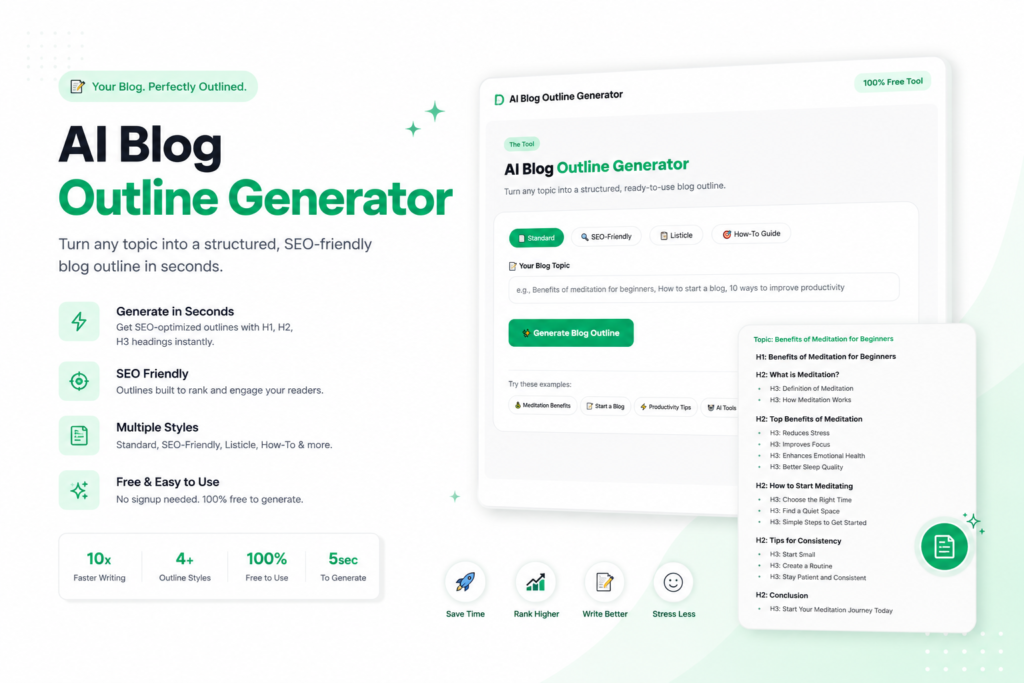
Creating high-quality blog content consistently is one of the biggest challenges for content creators, bloggers, and businesses. The AI Blog Outline Generator is a powerful free tool that helps you structure your thoughts, save hours of planning time, and produce SEO-friendly content that actually ranks on Google. In this comprehensive guide, we’ll explore everything you need to know about using an AI outline generator, its benefits, drawbacks, and how to maximize your content strategy.
Table of Contents
What is an AI Blog Outline Generator?
An AI Blog Outline Generator is an artificial intelligence-powered tool that automatically creates a structured framework for your blog posts. Instead of staring at a blank page wondering where to start, you simply enter your topic, choose a style, and the tool generates a complete outline with H1, H2, H3 headings, subheadings, and key points.Think of it as your personal writing assistant that never gets tired. It helps you organize your thoughts logically, ensures you don’t miss important sections, and gives you a clear roadmap to follow. Whether you’re writing a 500-word blog post or a 5000-word ultimate guide, this outline generator adapts to your needs.The tool uses advanced algorithms trained on millions of successful blog posts. It understands what makes content engaging, what search engines look for, and how readers consume information online.
Why You Need a Blog Outline Generator in 2026-27
Content creation is more competitive than ever. According to recent studies, over 7 million blog posts are published every single day. Standing out requires not just good writing, but strategic structuring. Here’s why an AI outline generator has become essential:
Saves Hours of Planning Time
Instead of spending 30-60 minutes brainstorming and organizing your blog structure, this tool does it in under 5 seconds. That’s time you can invest in actual writing, research, or promotion.
Eliminates Writer’s Block
One of the biggest struggles for writers is knowing what to write next. An outline gives you a clear path forward. You never have to stare at a blank page wondering “what now?”
Ensures Comprehensive Coverage
Without an outline, it’s easy to miss important points. This AI generator ensures you cover all aspects of your topic, from introduction to conclusion, including all key subtopics.
Improves Readability and Flow
A well-structured outline naturally leads to better flow. Your readers will find your content easier to follow, understand, and remember.
SEO Benefits
Search engines love well-structured content. Proper heading hierarchy (H1, H2, H3) signals to Google what your content is about and helps you rank for relevant keywords.
4 Outline Styles Explained in Detail
The AI Blog Outline Generator offers four distinct styles, each designed for different types of content.
1. Standard Outline
Best for: General blog posts, informational articles, news pieces, opinion pieces.
The standard outline follows a classic structure: Introduction, 3-5 main sections with supporting points, and a conclusion. It’s versatile and works for almost any topic. The introduction hooks readers and states the problem. Main sections explore key aspects with explanations, examples, and data. The conclusion summarizes takeaways and includes a call to action.
Example use case: “Benefits of meditation for beginners” — the outline would cover what meditation is, scientific benefits, how to start, common challenges, and tips for consistency.
2. SEO-Friendly Outline
Best for: Content designed to rank on Google, affiliate posts, commercial intent articles.
This style is optimized for search engines. It includes strategic keyword placement in headings, suggests related LSI keywords, and structures content in a way Google prefers. The outline includes sections for meta description suggestions, FAQ schema opportunities, and internal/external linking recommendations.
Key features: Primary keyword in H1, secondary keywords in H2s, FAQ section for rich snippets, and a conclusion that reinforces the main keyword.
3. Listicle Outline
Best for: “Top 10” posts, “Best ways” articles, “X tips” content, product roundups.
Listicles are among the most shared and clicked content formats. The listicle outline generates a numbered structure with an engaging introduction, clear item-by-item breakdown, and a conclusion that recaps and asks for engagement.
Each item in the list includes a heading, brief explanation, why it’s included, and a key takeaway. This format is perfect for mobile readers who scan content.
Example: “10 ways to improve productivity” — each tip gets its own section with actionable advice and examples.
4. How-To Guide Outline
Best for: Tutorials, step-by-step guides, DIY articles, educational content.
The how-to outline is structured for instructional content. It includes prerequisites, materials needed, time estimates, numbered steps, troubleshooting sections, and a final verification checklist.
This style is ideal for content where readers expect clear, actionable instructions. Each step is broken down with detailed sub-points, pro tips, and common mistakes to avoid.
Example: “How to start a blog” — includes platform selection, hosting setup, domain registration, design, content creation, and promotion strategies.
PROS and CONS of Using an AI Blog Outline Generator
Before fully adopting any tool, it’s important to understand both its strengths and limitations.
| PROS (Advantages) | CONS (Disadvantages) |
| Speed and Efficiency — Generates a complete outline in under 5 seconds. What used to take 30-60 minutes now takes seconds. | Not a Complete Writer — The outline is a framework, not finished content. You still need to write the actual post. |
| Consistency — Maintains the same high-quality structure across all your blog posts. Your content will have a consistent, professional feel. | May Require Customization — Every topic is unique. You might need to add, remove, or rearrange sections. |
| Overcomes Writer’s Block — Never stare at a blank page again. The outline gives you immediate direction and momentum. | Generic Suggestions — The AI suggests placeholders like “[First Item Name]” that you need to replace. |
| SEO Optimization — Built-in SEO best practices ensure your content is structured for search engines from the start. | Limited to Outlines — This tool generates outlines only. It doesn’t write full blog posts. |
| Educational Value — Over time, you’ll learn what makes a good outline by seeing the patterns the AI uses. | Internet Connection Required — Like all online tools, you need an active internet connection. |
| Versatility — Works for any niche — technology, health, lifestyle, business, education, entertainment, and more. | Learning Curve — First-time users might need a few tries to understand which style works best. |
| Free to Use — No subscription costs, no hidden fees. Generate unlimited outlines at no charge. | Not Human-Exclusive — The AI doesn’t understand your unique voice or brand personality perfectly. |
| No Signup Required — Privacy-focused. You don’t need to create an account or share personal information. | May Feel Restrictive — Some creative writers prefer free-form unstructured writing. |
| Copy with One Click — Easy export to Google Docs, WordPress, Notion, or any writing tool. | |
| Multiple Styles — Four different outline styles mean you have options for different content types. |
Who Should Use This AI Blog Outline Generator?
This tool is valuable for a wide range of users:
Whether you’re a hobby blogger or professional, outlines help you publish more consistently. Batch create outlines for a month’s worth of content in one sitting.
Create content that ranks. The SEO-friendly style includes keyword placement suggestions and structure that Google loves.
Freelancers and agency writers can save hours of planning time. More outlines = more billable hours spent on actual writing.
Running a business leaves little time for content creation. Use outlines to quickly structure blog posts for your company website.
Essay writing becomes easier with a clear structure. Use the outline generator for research papers, term papers, and presentations.
Maintain consistent content quality across multiple writers. Outlines ensure everyone follows the same structure.
The structured format helps organize thoughts clearly before writing in English.
How to Maximize Results from This Tool
Follow these best practices to get the most value:
1. Be Specific with Your Topic
Instead of “meditation,” try “benefits of meditation for beginners with anxiety.” The more specific you are, the more relevant your outline will be.
2. Experiment with Different Styles
Don’t settle for the first outline. Try all four styles to see which one best fits your content goals.
3. Customize After Generation
The outline is a starting point, not the final word. Add your unique insights, remove irrelevant sections, and reorder points as needed.
4. Use for Batch Planning
Set aside one hour per week to generate outlines for all your upcoming posts. This creates a content roadmap you can follow.
5. Combine with Keyword Research
Use your keyword research to inform the topic you enter. The outline will naturally incorporate those themes.
6. Review Before Writing
Always review the generated outline. Make sure it covers everything you want to say before you start writing.
7. Save Your Outlines
Keep a library of outlines you’ve generated. They’re great for repurposing content or creating series.
Frequently Asked Questions (FAQs)
Q1: Is the AI Blog Outline Generator really free?
Yes, 100% free forever. No signup, no email, no credit card, no hidden fees. Generate unlimited outlines at no cost.
Q2: Can I use this for any blog niche?
Absolutely! The tool works for any topic or industry — technology, health and wellness, lifestyle, business and finance, education, travel, food, fashion, entertainment, real estate, and more.
Q3: What outline styles are available?
Four styles: Standard (general blog posts), SEO-Friendly (optimized for search engines), Listicle (top 10, best ways), and How-To Guide (tutorials, step-by-step).
Q4: How long does it take to generate an outline?
Less than 5 seconds. Results are instant every time. No waiting, no processing delays.
Q5: Can I edit the outline after generation?
Yes! Copy the outline and paste it into Google Docs, WordPress, Notion, Microsoft Word, or any text editor. You can then add, remove, or rearrange sections freely.
Q6: Is this good for SEO?
Yes, especially the SEO-Friendly style. It includes keyword placement recommendations, proper heading hierarchy (H1, H2, H3), and suggests related topics that improve topical authority.
Q7: Do I need technical skills to use this tool?
None at all. If you can type a topic and click a button, you can use this tool. It’s designed for complete beginners.
Q8: Can I use the outline for YouTube scripts or podcasts?
Absolutely! The outlines work great for video scripts, podcast episodes, email newsletters, and course modules.
Q9: How is this different from ChatGPT?
This tool is specialized for blog outlines only. It gives you a structured, ready-to-use template with proper headings. ChatGPT gives free-form responses that require more editing. This tool saves you time specifically for outlining.
Q10: Will the AI understand my unique brand voice?
The outline provides structure, not word-for-word content. You add your brand voice when you write the actual post. The outline ensures you cover all important points in a logical order.
Real-World Success Stories
Content creators across the world are using AI outline generators to scale their content production:
Case Study 1: Lifestyle Blogger
A wellness blogger was struggling to post weekly. Using AI outlines, she now batches 4 outlines in 10 minutes. Her posting frequency increased from 2 to 4 posts per week, and her organic traffic grew by 180% in 3 months.
Case Study 2: SEO Agency
An SEO agency used outlines to train junior writers. Consistent structure across all client blogs improved quality scores and reduced editing time by 40%.
Case Study 3: E-commerce Brand
A small e-commerce store started a blog to drive traffic. Using SEO-friendly outlines, they published 20 posts in 2 months and saw their first $5,000 in organic sales.
How This Tool Compares to Other Outline Generators
| Feature | Our Tool | Other Tools |
| Price | Free | Often $10-30/month |
| Signup Required | No | Usually yes |
| Outline Styles | 4 | 1-2 |
| SEO Optimization | Yes | Rarely |
| Copy with One Click | Yes | Sometimes |
| No Limits | Yes | Often limited |
Conclusion: Start Creating Better Blog Outlines Today
The AI Blog Outline Generator is a powerful tool that transforms how you plan and structure content. It saves time, eliminates writer’s block, ensures SEO best practices, and helps you publish consistently.Whether you’re a beginner blogger or professional content creator, this free tool will level up your writing workflow. The four outline styles give you flexibility for any content type. The PROS far outweigh the CONS — especially considering it’s completely free with no strings attached.Stop staring at blank pages. Start with a structure that works. Generate your first outline today and experience the difference.Try the AI Blog Outline Generator now — enter any topic above and click generate. See how fast you can go from idea to published post.
About ibraida.com
ibraida helps entrepreneurs, freelancers, and digital workers discover the best AI tools, strategies, and resources. Visit ibraida.com for more free AI tools, startup ideas, and digital growth guides.
AI Prompt Optimizer
Transform basic prompts into powerful instructions. Get 10x better results from ChatGPT, Claude, and Midjourney.
AI Tool Stack Builder
Discover 50+ top AI tools across 8 categories. Build your perfect AI workflow in minutes. Free, no signup.